Audit Log
For Brands
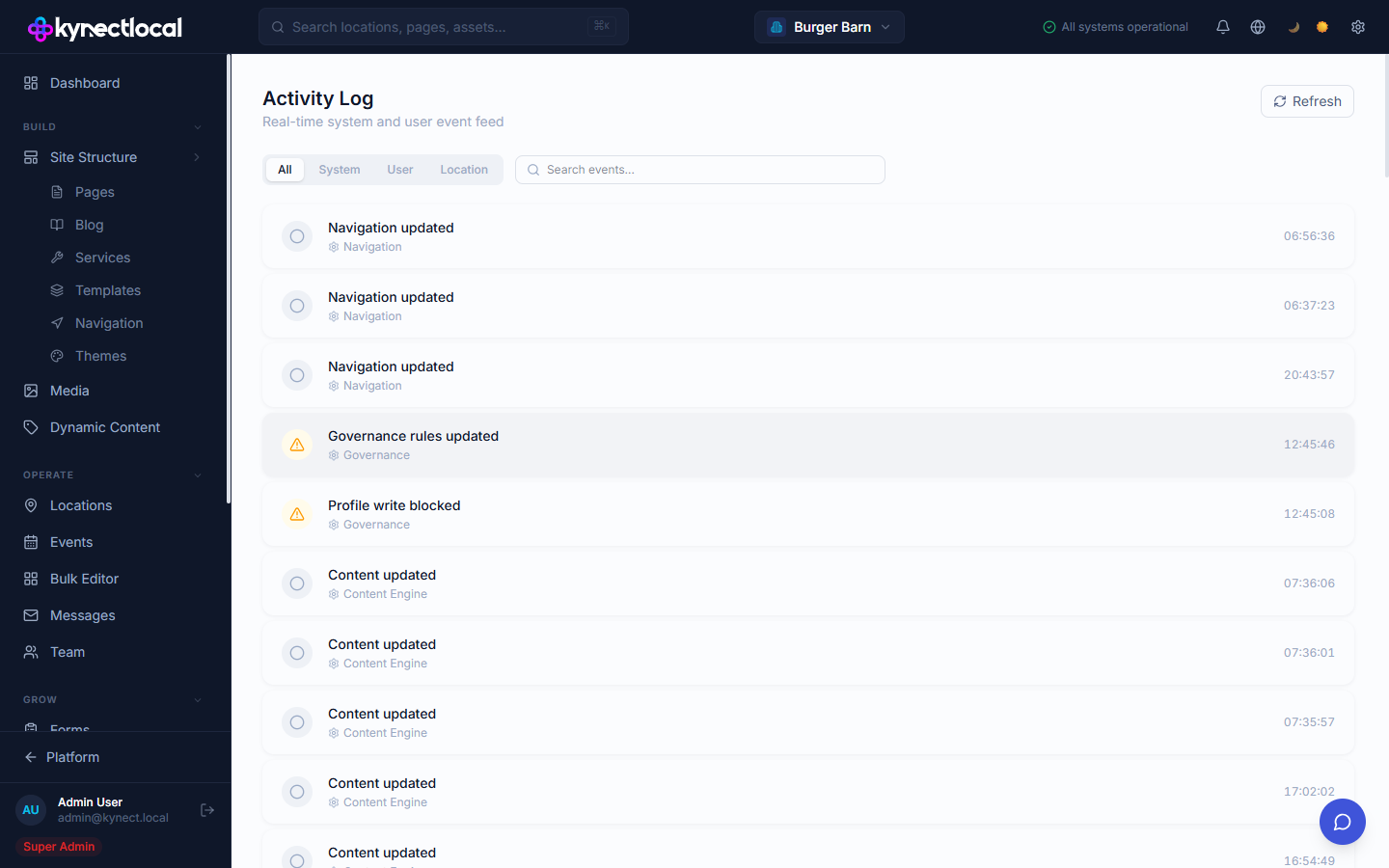
The Audit Log (labeled Activity Log in the admin) is a real-time event feed that records all significant actions taken in your brand — content changes, governance enforcement, navigation updates, user actions, and location-level events. Use it to track what changed and when.
When you’d use this
Section titled “When you’d use this”- Investigating an unexpected change to a page or navigation item
- Reviewing recent governance enforcement events
- Checking what actions a specific user has taken
- Auditing activity at a specific location
The Activity Log
Section titled “The Activity Log”
Go to Account → Audit Log. The page shows a chronological feed of events with a Refresh button to load the latest entries.
Filtering events
Section titled “Filtering events”| Filter | What it shows |
|---|---|
| All | Every event in the log |
| System | Automated system events (content engine updates, scheduled jobs) |
| User | Actions taken by a logged-in user (edits, saves, invites) |
| Location | Events scoped to a specific location |
Use the Search events box to filter by event name or category.
Event types
Section titled “Event types”Each event in the log shows:
- Icon — a circle for informational events; a warning triangle for governance or blocked actions
- Event name — a short description of what happened (e.g. “Navigation updated”, “Profile write blocked”)
- Category — the system area that generated the event (e.g. Navigation, Governance, Content Engine)
- Timestamp — the time the event occurred
Common event categories:
| Category | Examples |
|---|---|
| Navigation | Header or footer menu updated |
| Governance | Rules updated, franchisee write blocked |
| Content Engine | Page content updated, template applied |
| User | Team member invited, role changed |
| Location | Location profile edited, status changed |
Related
Section titled “Related”- Team — see who has access and can generate user events
- Locations — location profile changes appear as Location events
- Navigation — navigation changes are logged as Navigation events